# BingX

<figure><img src="https://793384675-files.gitbook.io/~/files/v0/b/gitbook-x-prod.appspot.com/o/spaces%2FsQezxfp9oB9jrccv5OA4%2Fuploads%2FCcjRfhfQNEIpthonY3B3%2Fimage.png?alt=media&#x26;token=772851f9-6bfc-4133-924d-613f22c7aab9" alt=""><figcaption></figcaption></figure>

* You can connect as many bots as you want on BingX, however you can only connect 1 Runbot Strategy per BingX Signal Bot and sub-account. \
  If you want to run 3 different strategies, you'll need to create 3 different BingX Signal Bots and 3 different [sub-accounts](https://support.bingx.com/hc/en-001/articles/20255260567065-BingX-Subaccount-Feature-Introduction-and-FAQs).

***

* ### To receive your Strategy Alerts directly on BingX and automate your trading, go to <https://app.runbot.io/Bot/> or directly click on "Alerts Bots".

<figure><img src="https://793384675-files.gitbook.io/~/files/v0/b/gitbook-x-prod.appspot.com/o/spaces%2FsQezxfp9oB9jrccv5OA4%2Fuploads%2FAi4ljGRTG29vyGesbAYe%2Fimage.png?alt=media&#x26;token=05de89ec-e77b-4a9d-8a0a-0d36cb5a7c96" alt="" width="157"><figcaption></figcaption></figure>

Then click "+ Create new webhook" just below "Free webhooks".

<figure><img src="https://793384675-files.gitbook.io/~/files/v0/b/gitbook-x-prod.appspot.com/o/spaces%2FsQezxfp9oB9jrccv5OA4%2Fuploads%2Fk7ceu8NOuLwUpFFC8y2N%2Fimage.png?alt=media&#x26;token=424b1de2-275a-4b7f-97ce-316f55c8cf24" alt=""><figcaption></figcaption></figure>

***

On the Bot webhook configuration box, select 'Linked strategy' and pick the strategy you want to receive alerts from.

<figure><img src="https://793384675-files.gitbook.io/~/files/v0/b/gitbook-x-prod.appspot.com/o/spaces%2FsQezxfp9oB9jrccv5OA4%2Fuploads%2FBgnV9lZWNm3lVAmxFNra%2Fimage.png?alt=media&#x26;token=9b3cc649-67d4-4f4f-b677-b939a91854b2" alt=""><figcaption></figcaption></figure>

***

Enter the exact amount of capital you wish to allocate to your trading strategy. The size of your orders will be based on this reference, which can be a lower or a higher amount, depending on the leverage of your strategy.&#x20;

<figure><img src="https://793384675-files.gitbook.io/~/files/v0/b/gitbook-x-prod.appspot.com/o/spaces%2FsQezxfp9oB9jrccv5OA4%2Fuploads%2FfCdwjranolfcyJv3ozya%2Fimage.png?alt=media&#x26;token=650aab77-6609-41dc-99ea-8fe996db5231" alt=""><figcaption></figcaption></figure>

***

Select BingX to send alerts:&#x20;

<figure><img src="https://793384675-files.gitbook.io/~/files/v0/b/gitbook-x-prod.appspot.com/o/spaces%2FsQezxfp9oB9jrccv5OA4%2Fuploads%2FyhzJ2vJYre0JSiGUI035%2Fimage.png?alt=media&#x26;token=5eecf027-9560-4731-9771-a234a706b4d4" alt=""><figcaption></figcaption></figure>

***

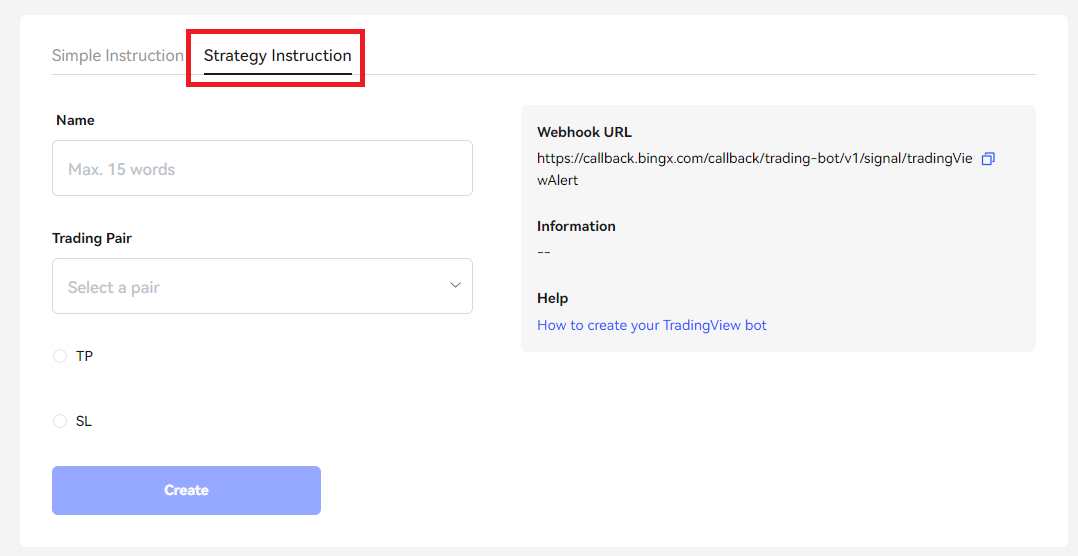
Select "Strategy Instruction"

<figure><img src="https://793384675-files.gitbook.io/~/files/v0/b/gitbook-x-prod.appspot.com/o/spaces%2FsQezxfp9oB9jrccv5OA4%2Fuploads%2FmKMF2KxFKQe4qDFeaJN4%2Fbingx.PNG?alt=media&#x26;token=f9ffa1dd-147a-4466-9c32-1ede1491c35b" alt=""><figcaption></figcaption></figure>

***

Choose a name for your trading robot and select the currency pair on which you want your Runbot strategy to trade.

<figure><img src="https://793384675-files.gitbook.io/~/files/v0/b/gitbook-x-prod.appspot.com/o/spaces%2FsQezxfp9oB9jrccv5OA4%2Fuploads%2F2nh1rT9VYodF3YIjE8Ut%2Fimage.png?alt=media&#x26;token=08be4557-a1b0-4da6-99bd-df7dfc664108" alt=""><figcaption></figcaption></figure>

***

**Change Isolated Margin by Cross Margin.**&#x20;

Click "Change settings".

<figure><img src="https://793384675-files.gitbook.io/~/files/v0/b/gitbook-x-prod.appspot.com/o/spaces%2FsQezxfp9oB9jrccv5OA4%2Fuploads%2FXWa4Le9z2GkIZ4st6Fx8%2Fchangesettings.png?alt=media&#x26;token=49708411-9ede-4816-a02f-d41eb0bf3daf" alt=""><figcaption></figcaption></figure>

Then click "Isolated Margin" on the top right of your screen.

<figure><img src="https://793384675-files.gitbook.io/~/files/v0/b/gitbook-x-prod.appspot.com/o/spaces%2FsQezxfp9oB9jrccv5OA4%2Fuploads%2FmCCjr7cBhvsEDm2BBwb7%2Fcrossmaring.PNG?alt=media&#x26;token=682e7462-782c-443b-97e2-57afd53004b1" alt=""><figcaption></figcaption></figure>

Select Cross Margin and click ![](https://793384675-files.gitbook.io/~/files/v0/b/gitbook-x-prod.appspot.com/o/spaces%2FsQezxfp9oB9jrccv5OA4%2Fuploads%2F3yX8aK2OdhXL0Ie4EXsB%2Fimage.png?alt=media\&token=315046e9-caa2-4b21-837a-81680c794057).

<figure><img src="https://793384675-files.gitbook.io/~/files/v0/b/gitbook-x-prod.appspot.com/o/spaces%2FsQezxfp9oB9jrccv5OA4%2Fuploads%2FMUFpS3zP6OKfA75zmlfB%2Fimage.png?alt=media&#x26;token=62e59c05-895e-4a69-8552-2f78137e9550" alt=""><figcaption></figcaption></figure>

***

Enter on Runbot, the USDT the **exact** capital you have in your BingX trading account, and your **exact** current leverage.&#x20;

You can find your leverage on the same page here: ![](https://793384675-files.gitbook.io/~/files/v0/b/gitbook-x-prod.appspot.com/o/spaces%2FsQezxfp9oB9jrccv5OA4%2Fuploads%2FOuh83H5CJraITqXL6ivm%2FleverageBingx.PNG?alt=media\&token=24d26ea1-177d-4a26-919c-0fa708b23f56)

<figure><img src="https://793384675-files.gitbook.io/~/files/v0/b/gitbook-x-prod.appspot.com/o/spaces%2FsQezxfp9oB9jrccv5OA4%2Fuploads%2F7ib8gUbWNshFw1wrbj4a%2Fimage.png?alt=media&#x26;token=29a165bf-4cc5-4287-906b-eb8316bee734" alt=""><figcaption><p><strong>Serves only as collateral, max leverage possible is 10 in this example for our position.</strong></p></figcaption></figure>

*Due to the nature of BingX webhooks, to keep sending accurate trade sizings, it is essential to regularly update your capital in the Runbot webhook. However, to bypass this manual process, you have the option to enable an automatic feature that estimates and updates this information for you. Please note that this is an estimation only, as we do not receive balance updates directly from BingX.*

<figure><img src="https://793384675-files.gitbook.io/~/files/v0/b/gitbook-x-prod.appspot.com/o/spaces%2FsQezxfp9oB9jrccv5OA4%2Fuploads%2FZSvMOnvNtYUGxAu0nJ6b%2Fimage.png?alt=media&#x26;token=c8e540ff-0d14-4274-8b12-78a6e85281a9" alt=""><figcaption></figcaption></figure>

***

Then click ![](https://793384675-files.gitbook.io/~/files/v0/b/gitbook-x-prod.appspot.com/o/spaces%2FsQezxfp9oB9jrccv5OA4%2Fuploads%2FQ8Xep39LeUv0Hab0ukCr%2Fimage.png?alt=media\&token=7c2e9404-b9ed-407c-aeca-13d32db59a92)

***

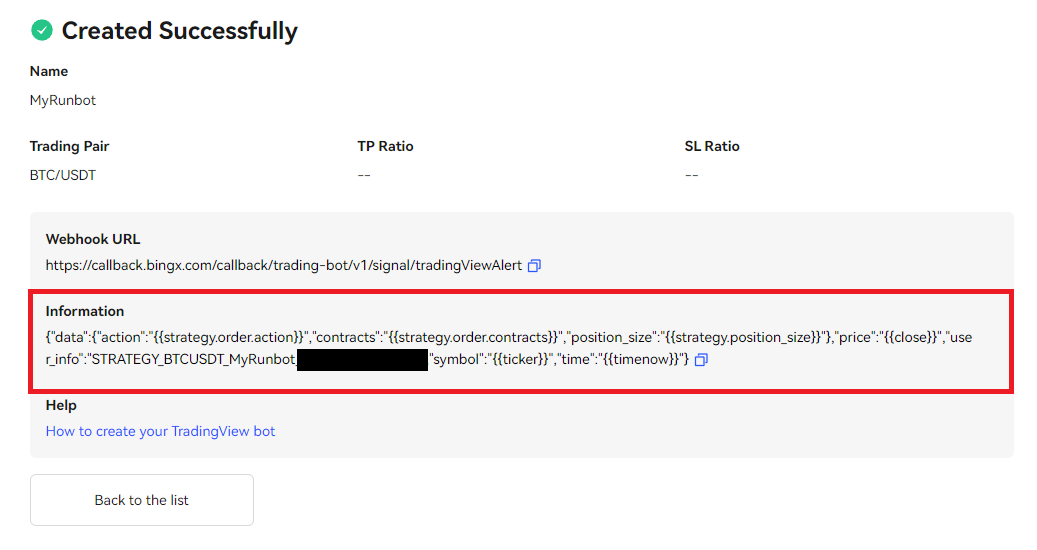
Copy the Information message below (red area).

<figure><img src="https://793384675-files.gitbook.io/~/files/v0/b/gitbook-x-prod.appspot.com/o/spaces%2FsQezxfp9oB9jrccv5OA4%2Fuploads%2Fo28c4usmNgOU8SkiHWY7%2Fcopybingx.PNG?alt=media&#x26;token=c71f3a6b-76af-4f20-948d-ea6aa041d9fa" alt=""><figcaption></figcaption></figure>

***

Go back to Runbot trading page, <https://app.runbot.io/Bot/> and paste the message in the User\_info input box:

<figure><img src="https://793384675-files.gitbook.io/~/files/v0/b/gitbook-x-prod.appspot.com/o/spaces%2FsQezxfp9oB9jrccv5OA4%2Fuploads%2FeFTwQ6mXn9NTosfTH66B%2Fuserinfobingx.PNG?alt=media&#x26;token=da0e2f42-6219-48b1-807a-2f16ee17fb6d" alt=""><figcaption></figcaption></figure>

***

Click ![](https://793384675-files.gitbook.io/~/files/v0/b/gitbook-x-prod.appspot.com/o/spaces%2FsQezxfp9oB9jrccv5OA4%2Fuploads%2FFGde8EzWzJE4Aghk4lx8%2Fimage.png?alt=media\&token=8b02c884-6a76-46ca-8d88-a936b95c44bb) and ![](https://793384675-files.gitbook.io/~/files/v0/b/gitbook-x-prod.appspot.com/o/spaces%2FsQezxfp9oB9jrccv5OA4%2Fuploads%2FgNCL2gdabJPUxhtazCmS%2Fimage.png?alt=media\&token=38687f1a-c8b3-4328-8a86-ff0b68d55877) to start your automated trading with BingX  and Runbot!

***

Happy Trading!