> For the complete documentation index, see [llms.txt](https://docs.runbot.io/llms.txt). Markdown versions of documentation pages are available by appending `.md` to page URLs; this page is available as [Markdown](https://docs.runbot.io/webhooks-trading-bots/bitget.md).
# Bitget
Connect your Runbot Alerts with Bitget to send free trading bot orders.
* To learn more about Bitget Signal bots documentation please read [here](https://www.bitget.com/support/articles/12560603801962).
***
### **To receive your Strategy Alerts directly on Bitget and automate your trading, go to** [**https://app.runbot.io/Bot/**](https://app.runbot.io/Bot/) **or directly click on "Alerts Bots".**
Then click "+ Create new webhook" just below "Free webhooks".
***
On the Bot webhook configuration box, select 'Linked strategy' and pick the strategy you want to receive alerts from.
***
Enter the exact amount of capital you wish to allocate to your trading strategy. The size of your orders will be based on this reference, which can be a lower or a higher amount, depending on the leverage of your strategy.
***
Select Bitget to send alerts:
***
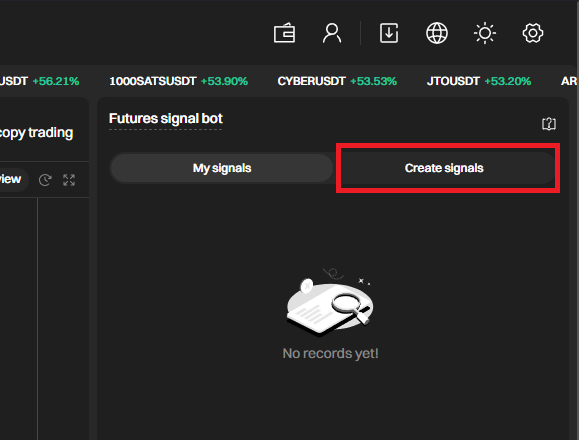
Click on the right side of your screen "Create Signals".
***
Pick a name and a description for your strategy.
***
Copy the Webhook URL to associate the signal with Runbot.
***
Go back to Runbot trading page, and paste the message in the Webhook URL input box:
***
Click "Create Signals" on Bitget.
***
Find your freshly created Signal bot in "My Signals" and click use.
***
Click "+Add trading pair" and select the trading pair you want your Runbot strategy to trade.
***
Select "Follow from the first signal".
***
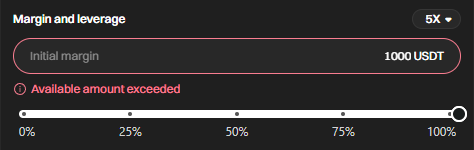
In the "Margin and Leverage" section, choose the maximum amount of USD that you want your trading bot to reach at any given time.
**In this scenario, the trading bot can open a position of up to 5,000 USDT (calculated by multiplying the initial margin of 1000 by a leverage of 5).**
**However, it's important to note that not every trade will necessarily reach the full 5,000 USDT equivalent. The actual position size will depend on your Runbot strategy and the initial capital configured on Runbot, which may be lower.**
Click "Create" and "Confirm".
***
Go back to your Runbot trading page,
Click  and  to start your automated trading with Bitget and Runbot!
***
Happy Trading!