# Blofin

* To learn more about Blofin Signal bots documentation please read [here](https://phemex.com/help-center/how-to-use-signal-trading-bots-on-phemex-web).

***

### **To receive your Strategy Alerts directly on Blofin and automate your trading, go to** [**https://app.runbot.io/Bot/**](https://app.runbot.io/Bot/) **or click directly on "Alerts Bots"**

<figure><img src="https://793384675-files.gitbook.io/~/files/v0/b/gitbook-x-prod.appspot.com/o/spaces%2FsQezxfp9oB9jrccv5OA4%2Fuploads%2FRFvu052402Ra0blamMmo%2Fimage.png?alt=media&#x26;token=1f1bc20a-b3ed-4022-b62d-44311fe537cd" alt="" width="157"><figcaption></figcaption></figure>

Then click "+ Create new webhook" just below "Free webhooks".

<figure><img src="https://793384675-files.gitbook.io/~/files/v0/b/gitbook-x-prod.appspot.com/o/spaces%2FsQezxfp9oB9jrccv5OA4%2Fuploads%2F74BwuwPF6a7onM1tK1vY%2Fimage.png?alt=media&#x26;token=1e3536f3-28fc-4e7e-b997-c5ec64c755b0" alt=""><figcaption></figcaption></figure>

***

On the Bot webhook configuration box, select 'Linked strategy' and pick the strategy you want to receive alerts from.

<figure><img src="https://793384675-files.gitbook.io/~/files/v0/b/gitbook-x-prod.appspot.com/o/spaces%2FsQezxfp9oB9jrccv5OA4%2Fuploads%2FdA3Dxb0EWugmPmbYbpvo%2Fimage.png?alt=media&#x26;token=c0c51251-c635-4f43-9b88-899798c57854" alt=""><figcaption></figcaption></figure>

***

Enter the exact amount of capital you wish to allocate to your trading strategy. The size of your orders will be based on this reference, which can be a lower or a higher amount, depending on the leverage of your Runbot strategy.&#x20;

<figure><img src="https://793384675-files.gitbook.io/~/files/v0/b/gitbook-x-prod.appspot.com/o/spaces%2FsQezxfp9oB9jrccv5OA4%2Fuploads%2FAoj49fDywFFNmA28kARE%2Fimage.png?alt=media&#x26;token=3c3020ae-0eb7-4ffd-a491-e5918e97d3a5" alt=""><figcaption></figcaption></figure>

***

Select Blofin to send alerts:&#x20;

<figure><img src="https://793384675-files.gitbook.io/~/files/v0/b/gitbook-x-prod.appspot.com/o/spaces%2FsQezxfp9oB9jrccv5OA4%2Fuploads%2F3zMuff2csX5LcIjAKBr7%2Fimage.png?alt=media&#x26;token=0d6fb6a1-a6ea-4665-a61c-864b44821900" alt="" width="375"><figcaption></figcaption></figure>

***

To create your Blofin Bot, go to Blofin Signal bots page, in the Futures section, click the link below:

<https://blofin.com/futures/bots/BTC-USDT>

Then go to the right corner and select "Trading Bots" and select "Signal Bot" in the Bot menu.

<figure><img src="https://793384675-files.gitbook.io/~/files/v0/b/gitbook-x-prod.appspot.com/o/spaces%2FsQezxfp9oB9jrccv5OA4%2Fuploads%2FMx4Jv7qmfHzJmQUEtChg%2Fimage.png?alt=media&#x26;token=30c9e95a-ef66-47db-a27e-c747941c0f62" alt="" width="340"><figcaption></figcaption></figure>

Then click on "+ Add a signal".

<figure><img src="https://793384675-files.gitbook.io/~/files/v0/b/gitbook-x-prod.appspot.com/o/spaces%2FsQezxfp9oB9jrccv5OA4%2Fuploads%2Fixa5XgOGUu3o9FWuM9J9%2Fimage.png?alt=media&#x26;token=d32591f0-2391-4f7b-9bba-38dffe61d37f" alt="" width="328"><figcaption></figcaption></figure>

***

In this window, add a name of your choice for the bot which will help you to recognize it.&#x20;

For example :

<figure><img src="https://793384675-files.gitbook.io/~/files/v0/b/gitbook-x-prod.appspot.com/o/spaces%2FsQezxfp9oB9jrccv5OA4%2Fuploads%2FrAwyaae14QsL1ZkPPhtp%2Fimage.png?alt=media&#x26;token=a523a614-caea-4cfc-8b69-46d421e69757" alt="" width="375"><figcaption></figcaption></figure>

Then click "Next"'.

***

On the next window,  go to section 2. and click "Copy".

<figure><img src="https://793384675-files.gitbook.io/~/files/v0/b/gitbook-x-prod.appspot.com/o/spaces%2FsQezxfp9oB9jrccv5OA4%2Fuploads%2FkF4Xn98GdgvIAy0aUhem%2Fimage.png?alt=media&#x26;token=03af9d7d-9ae3-4507-b8da-84e5691ee129" alt="" width="375"><figcaption></figcaption></figure>

Go back to <https://app.runbot.io/Bot/> and paste the previously copied message on the Signal token input box.

Save changes on Runbot and click "Create a Bot" on Blofin.&#x20;

<figure><img src="https://793384675-files.gitbook.io/~/files/v0/b/gitbook-x-prod.appspot.com/o/spaces%2FsQezxfp9oB9jrccv5OA4%2Fuploads%2FB7dscG561OieDQeC9Zjv%2Fimage.png?alt=media&#x26;token=671a94d5-9d2b-46cb-ad73-956cf4fe84ee" alt="" width="297"><figcaption></figcaption></figure>

***

* On the next window, select your 'Symbol" (The asset that your bot will trade).
* Enter the amount of USD capital you want to allocate to your strategy in the "Investment margin" input box. (Minimum amount is 50$)

**By default, you can leave the Leverage at 5x.** However if your strategy has a very high leverage, enter the maximum leverage of your strategy. This information can be found in your backtest infos. On the Backtest Stats box, click "Backtest informations", and read "Max position leverage".&#x20;

* Tick the box "Multiple Entry" in Entry settings.

Leave empty, by default, the "Stop Strategy" settings as this is handled by your Runbot strategy.

Then, click on "Create a bot" and Confirm.

<figure><img src="https://793384675-files.gitbook.io/~/files/v0/b/gitbook-x-prod.appspot.com/o/spaces%2FsQezxfp9oB9jrccv5OA4%2Fuploads%2FH1BVG04oKaKDqq4x1uBN%2Fimage.png?alt=media&#x26;token=84b9a653-f7c5-4e36-bf0c-1d3f0218bb02" alt="" width="325"><figcaption></figcaption></figure>

***

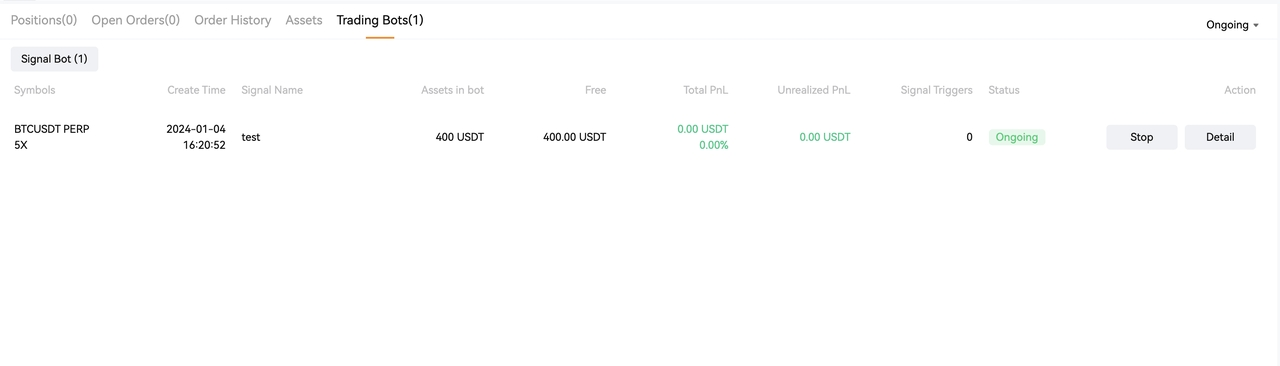
On the Futures page, under the chart, you can find the "Trading Bots" tab, this is where your freshly created bot is.

<figure><img src="https://793384675-files.gitbook.io/~/files/v0/b/gitbook-x-prod.appspot.com/o/spaces%2FsQezxfp9oB9jrccv5OA4%2Fuploads%2Fbx1QX2h75IMS9Tf7ITEv%2Fimage.png?alt=media&#x26;token=4c8efe9e-3e30-41b8-9fb6-1b02d7149e6d" alt=""><figcaption></figcaption></figure>

***

On Runbot, click ![](https://793384675-files.gitbook.io/~/files/v0/b/gitbook-x-prod.appspot.com/o/spaces%2FsQezxfp9oB9jrccv5OA4%2Fuploads%2FFGde8EzWzJE4Aghk4lx8%2Fimage.png?alt=media\&token=8b02c884-6a76-46ca-8d88-a936b95c44bb) and ![](https://793384675-files.gitbook.io/~/files/v0/b/gitbook-x-prod.appspot.com/o/spaces%2FsQezxfp9oB9jrccv5OA4%2Fuploads%2F9Fg66oPtX6Ku8tjsNLl1%2Fimage.png?alt=media\&token=7c99b6a4-a1e0-4f8f-ba91-ad65a980ba8a) to start your automated trading with Blofin and Runbot!

For more informations about how to manage your bot on Blofin, please refer to [this documentation](https://blofin.zendesk.com/hc/en-us/articles/8739832921231-How-to-Set-up-a-BloFin-Trading-Signal-Bot-with-TradingView).

***

Happy Trading!