> For the complete documentation index, see [llms.txt](https://docs.runbot.io/llms.txt). Markdown versions of documentation pages are available by appending `.md` to page URLs; this page is available as [Markdown](https://docs.runbot.io/risk-management-boxes/entry-in-position-methods/pyramid-orders.md).
# Pyramid orders
You can either decide to use pyramid entry method with Limit or Market orders.
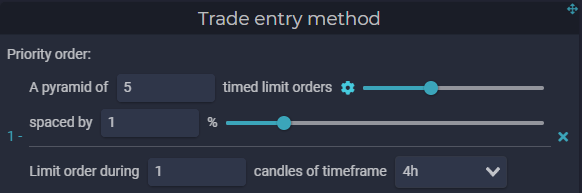
The pyramid limit orders method allows you to open a position with multiple limits orders at different prices (also can be referred as the dollar cost averaging strategy).
*Ex: We want to open a 100 000$ position with 5 different limits orders spaced by 1%.*
*The bot triggers a long position at 25 000$. Because we want to fill our order with 5 different limits entries, each limit order will represent 20% of our total position of 100 000$.*\
*The first long limit order is set at 25 000$ for a 20 000$ size. At the same time, 4 others limits orders will be placed, each of them with the same size, but at different prices during 4 hours only:*
* *Order 1: 20 000$ at 25 000$ Bitcoin price*
* *Order 2: 20 000$ at 24 750$ Bitcoin price (1% lower than first entry at 25 000$)*
* *Order 3: 20 000$ at 24 500$ (1% + 1% or 2% lower than first entry at 25 000$)*
* *Order 4: 20 000$ at 24 250$ (3% lower than first entry at 25 000$)*
* *Order 5: 20 000$ at 24 000$ (4% lower than first entry at 25 000$)*
*Additionnal orders will always be placed in favor of your side, if it's a long, entries will be placed lower, if it's the short, entries will be higher.*
Note that, your stop loss/take profit will be placed looking at your average entry price, and is calculated after all limit orders have expired.
### Pyramid Market order
The pyramid Market Order works exactly the same as the Pyramid Limit order, however it will use a stop-market order once the price reach the price-level targeted. \
By using this method, because of the nature of market orders, you'll be fully filled but you can also suffer a slippage.